
- UI/UX
- Interactivity
Web Accessibility Enhancer Plugin for Bubble
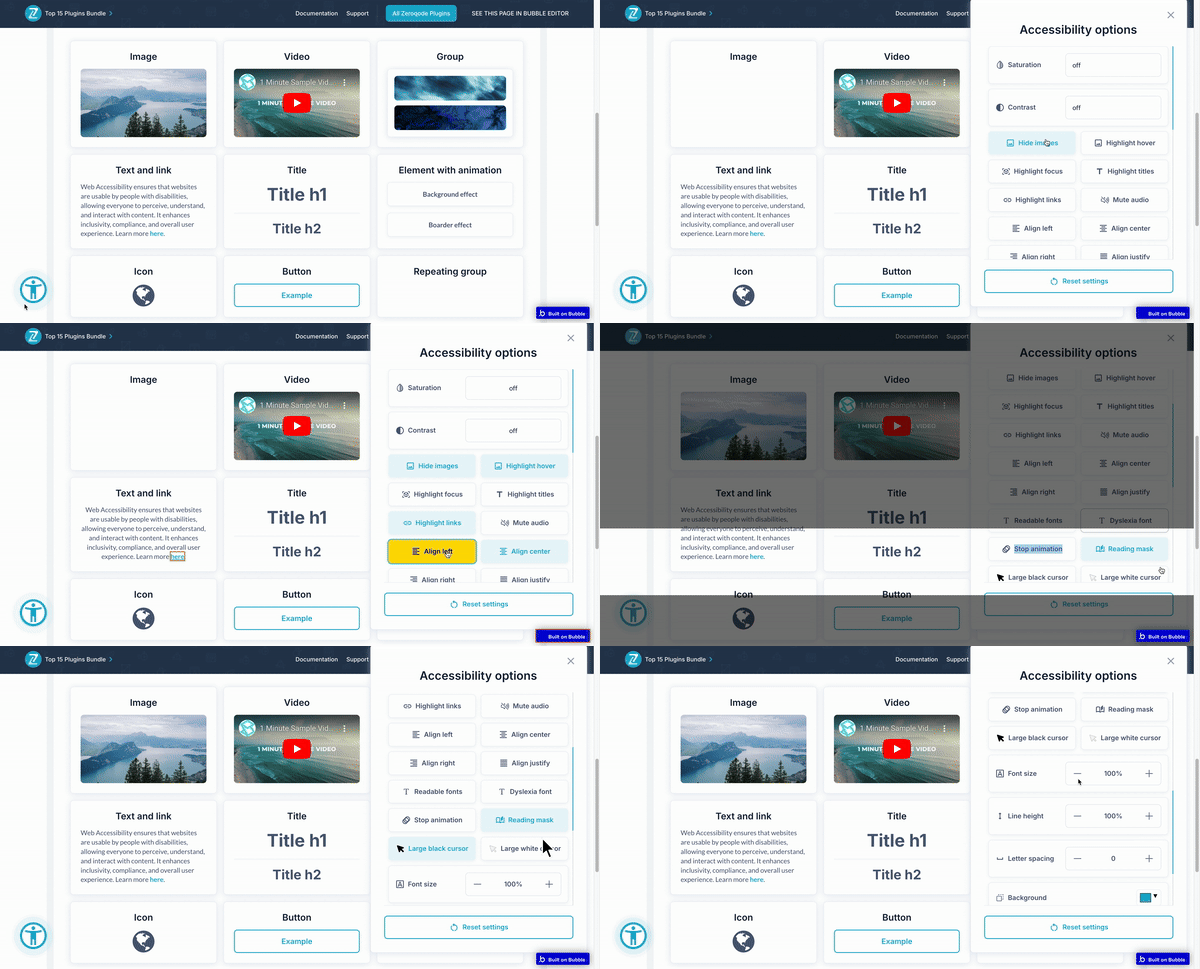
The Web Accessibility Enhancer plugin allows users to customize contrast, font size, colors, and more, improving website accessibility for individuals with visual impairments by enhancing readability and navigation.
$7/month or$70once
Plugin overview
The Web Accessibility Enhancer plugin is designed to make websites more accessible for individuals with low vision or other visual impairments. It offers a range of customizable actions that allow users to modify the visual and auditory elements of a webpage to meet their personal accessibility needs. By enabling users to control elements like contrast, font size, text spacing, and more, this plugin ensures a more inclusive and user-friendly web experience for everyone.
Key Features:
🔧 Customize the contrast and saturation levels of your webpage to enhance visibility for users with low vision.
🖼️ Toggle the visibility of images for a cleaner, more focused reading experience.
🔇 Easily mute any background audio to minimize distractions or support users who need a quieter browsing experience.
🖱️ Add hover and focus effects to make navigation easier for users relying on visual cues.
🔦 Increase the visibility of key titles and links, making it easier for users to find and follow important information.
🔠 Change font size, letter spacing, and line height to improve readability based on individual user preferences.
🛑 Disable animations that may cause distractions or discomfort for some users.
🎨 Tailor the background, title, and text colors to create an optimized viewing experience for all users.
📑 Use a reading mask to help users focus on specific sections of text, reducing strain and improving reading efficiency.
🖱️ Choose between black or white cursor options for better visibility against different backgrounds.
🔄 Easily reset all accessibility customizations with a single click, restoring the default view of the webpage.
🅰️ Switch to more readable fonts, or activate a dyslexia-friendly font for users with specific needs.
Additional materials


Social media


DISCOVER OUR PLUGINS
Similar plugins
- UserWay Accessiblity Widget Plugin for Bubble
Add accessibility tools like text resizing, contrast modes, keyboard navigation, and reading features. Control behavior via workflows and configure widget appearance and placement. ⚡ Main Functions: • Enable accessibility tools Add features
Free PluginDemo

Showing 1 of 1 plugins
Trusted by over 20,000 developers
Empowering your team with feature-packed plugins like Maps, OAuth, or Video Players

Need help building your app or automating your business?


BUILT ON TRUST
What our users say about our plugins
- Kivenemi
June 30, 2025
This Logo Carousel plugin looks like a great addition for Bubble mobile apps clean design and native responsiveness are key for professional presentation. I especially like the dynamic data support and flexible customization options. Perfect for showcasing partnerships or building brand trust in a sleek way!
- Isak Unfors
January 30, 2025
Super helpful and quick support! Makes me feel safe investing in their plugins.

Page 1 of 4
COMMON QUESTIONS
Plugins FAQ
How do plugins work?
Zeroqode plugins created on the Bubble platform and can be used only within the Bubble web apps. Plugins are essentially extensions that enhance Bubble’s visual or functional capabilities. Zeroqode Plugins range from complex third-party API integrations, AI, automation, to fancy visual elements, animations, and effects that would make your Bubble app look amazing. Most plugins come with a Demo page and documentation. Please refer to those in order to understand how to configure a particular plugin.
How to set up the plugin after the purchase?
In most cases you just need to place the element on the page and specify settings. For more details and information please check the plugin’s Documentation and Demo Page’s Editor carefully to see how it is configured.
Can I try a plugin before buying it?
Unfortunately, we do not have a trial period for our plugins. However, there is a very convenient way of trying the plugin without paying much.
If you are on paid plans you can subscribe to a plugin and use it for 1-2 days or any extent of time that you wish- when you subscribe to a plugin you pay only for the actual number of days you used it and not for the full month. The fee is added to the monthly bill (or yearly if the user is on a yearly plan), and the amount is prorated. If you subscribe to a plugin for one day you’ll end up being charged for this plugin fee / 30, so if it doesn't work for you within a few days you can uninstall it and it won't cost you much.🙂
If you are on Bubble’s Free plan, however (or Legacy Hobby plan) you’d only be able to purchase the plugin with a one-time payment. If that’s the case, before purchasing a plugin please check the plugin’s demo page and documentation carefully to make sure it suits your requirements and expectations.
Can I use a plugin in several apps?
You need to buy the plugin for each app, meaning if you’d like to use the same plugin in another app, you would need to buy it separately from that app.
What kind of support Zeroqode offers for users who buy plugins?
Zeroqode provides general support and guidance for purchased plugins. Please refer to the plugin's documentation and demo page in order to understand how to install and configure the plugin so it works as required. To find the right links please go to Zeroqode Plugins and search for a plugin you need help with. Please note that in order to be able to use some of the more advanced Bubble plugins - we recommend having at least beginner-level Bubble skills. Without them, it might be a bit overwhelming to understand how everything works.
For bugs or any other technical issues please post on Zeroqode Forum. It's a very active place where users report their problems and discuss solutions with our support team and each other. Before posting though, please make sure to search through the existing discussions- it's very likely that a solution to your issue has already been found and discussed.
Do you have Free plugins?
Yes, sure thing. To see all our free plugins please go to Zeroqode Plugins.
Do you offer plugin customization?
For sponsoring certain features to the plugins fill in the form.
How does the subscription plan work?
You will be charged only for the actual days used, the fee is added to the monthly bill (or yearly if the user is on a yearly plan), and the amount is prorated. If you subscribe to a plugin for one day you’ll end up being charged for this plugin fee / 31.
How to get the element's ID?
Please check the forum thread where it is described how to add ID attribute to HTML elements.
How to create service keys?
For information on how to obtain and install service keys please check the plugin documentation.
How to troubleshoot errors in plugin?
First of all, please make sure that the plugin is set up properly according to the documentation. Compare the plugin setup with the Editor for correctness. Check errors in the debugger (to enable the debug mode add at the end of the link: ?debug_mode=true) and dev console. To open the dev console use the shortcut (for most browsers on Mac is Alt + Command + I, for Windows - Ctrl + Shift + I). If the problem persists, please contact our support team via Zeroqode Forum.
ZEROQODE BENEFITS
Benefits of our plugins
 Somewhat
 SomewhatSomewhatSomewhat

Be the first to learn about special offers and important updates
Occasional newsletter about promotions, new plugins or changes to existing plugins delivered straight to your email