
- Authentication
- Integration
- Contacts
Sign In with Apple Plugin for Bubble
A Bubble.io plugin enabling simple user authentication with Apple ID and streamlined app submission for App Store publishing, including necessary Apple Sign-In integration for seamless user login and app review requirements.
$5/month or$50once
Plugin overview
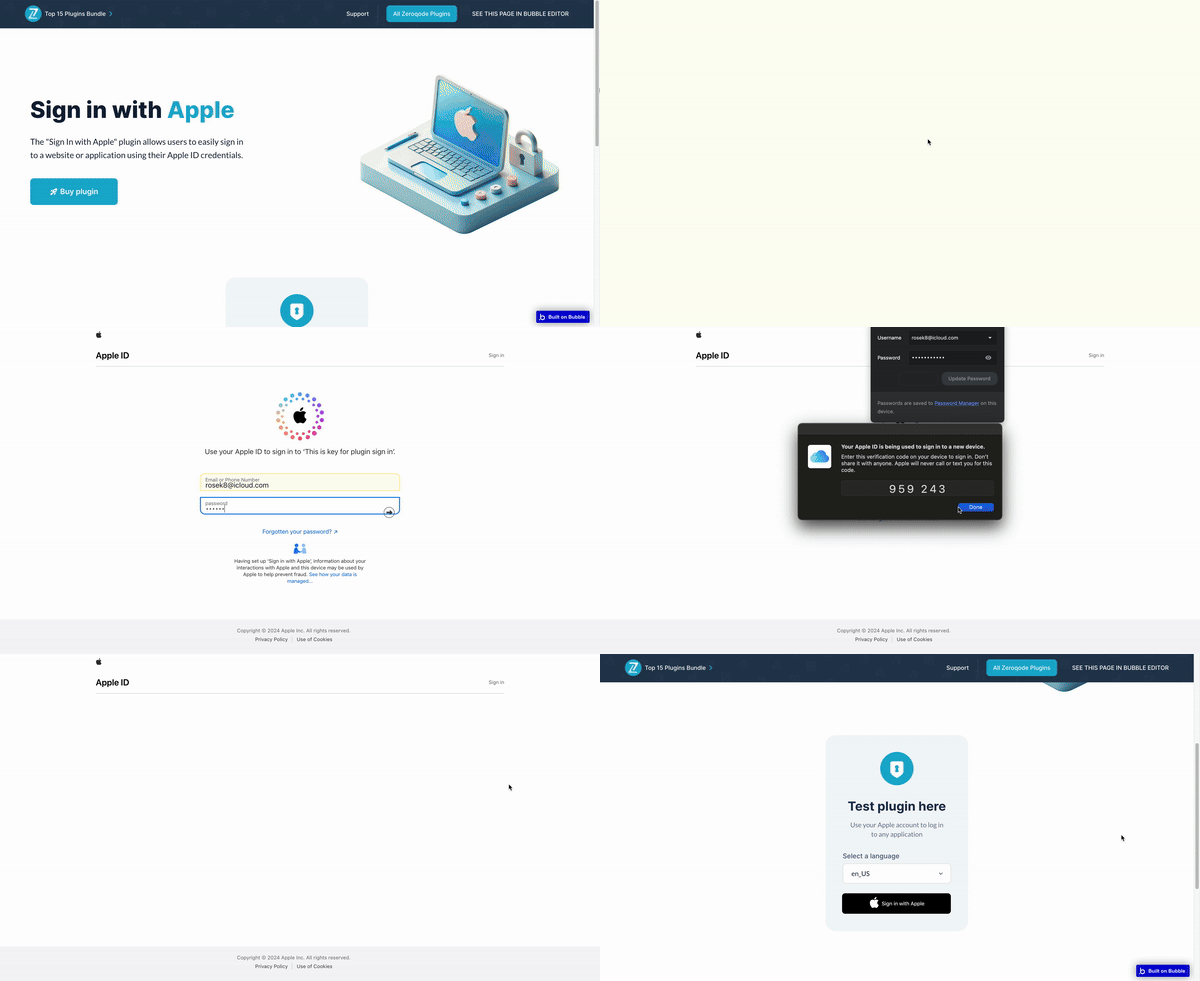
Try our must-have and handy no-code plugin for Bubble applications that easily enables user authentication with Apple ID and facilitates submission to the App Store for publishing.
Once your app is reviewed by the Apple Review Team, they will require Apple Signing to be implemented as one of the sign-in options.
Moreover, Sign in with Apple simplifies the sign-in process for users by allowing them to use their Apple ID to log in to your apps and websites. Instead of filling out forms, verifying email addresses, and creating new passwords, users can utilize Sign in with Apple to set up an account and start using your app immediately.
Prerequisites:
To interact with the plugin, you must have a developer account with Apple. Create your development account at: https://developer.apple.com/sign-in-with-apple/get-started/
Tip: Following the guidance provided by these sources will greatly facilitate the setup of the plugin:
Official documentation - see the "Documentation" link above.
To receive special offers and important updates please visit: https://zeroqo.de/updates
🔔 The most risk-free way to try out this plugin is to subscribe to it. If you unsubscribe a few days later you will be charged on pro-rata basis, so for example if the plugin monthly price is $5 then you’d pay only 17¢ per day ($5/30 days)!
Additional materials


Social media


DISCOVER OUR PLUGINS
Similar plugins
- Google One Tap Plugin for Bubble
Looking to introduce One Tap Sign-In into your app? Bring the 'One Tap Sign-In to Google' feature to your app users. This is a no-code plugin that offers a password-free experience. Here's how it works: -Use the Google One Tap element on yo
$4/month or $40 onceDemo - Stytch Passwordless Login Plugin for Bubble
The plugin revolutionizes the way you access your accounts by offering seamless entry through various platforms. With just a few clicks, you can log in using your GitHub, Twitter, Discord, or phone number, bypassing the need for traditional
Free PluginDemo - Face & Touch ID Plugin for Bubble
Try this no-code Face & Touch ID plugin specifically designed for Safari (iOS 13.3+ / Desktop Safari 13+) browsers on any Apple devices with a Face ID scanner or Touch ID sensor. While it should work on other platforms such as Android and W
$5/month or $50 onceDemo - Github - Login and Get Issues Plugin for Bubble
Enhance your Bubble app with the possibility to authenticate your users into GitHub with their credentials, get user details and retrieve the list of issues assigned to the user. Setup guide: 1. Add your application at https://github.com/se
Free PluginDemo - Telegram Login Plugin for Bubble
Now you can authorize users on your Bubble app through Telegram with a hassle-free no-code login widget, providing a straightforward method for user authentication on your website. Before utilizing the login plugin, ensure you have a Telegr
$7/month or $70 onceDemo - Login with Metamask Plugin For Bubble
Power up your crypto project on Bubble with this Login with MetaMask no-code plugin that allows you to authenticate users with their MetaMask wallets and obtain their Wallet IDs. Note: For the Google Chrome browser, make sure to install and
Free PluginDemo






Showing 6 of 6 plugins
Trusted by over 20,000 developers
Empowering your team with feature-packed plugins like Maps, OAuth, or Video Players

Need help building your app or automating your business?


BUILT ON TRUST
What our users say about our plugins
- Kivenemi
June 30, 2025
This Logo Carousel plugin looks like a great addition for Bubble mobile apps clean design and native responsiveness are key for professional presentation. I especially like the dynamic data support and flexible customization options. Perfect for showcasing partnerships or building brand trust in a sleek way!
- Isak Unfors
January 30, 2025
Super helpful and quick support! Makes me feel safe investing in their plugins.

Page 1 of 4
COMMON QUESTIONS
Plugins FAQ
How do plugins work?
Zeroqode plugins created on the Bubble platform and can be used only within the Bubble web apps. Plugins are essentially extensions that enhance Bubble’s visual or functional capabilities. Zeroqode Plugins range from complex third-party API integrations, AI, automation, to fancy visual elements, animations, and effects that would make your Bubble app look amazing. Most plugins come with a Demo page and documentation. Please refer to those in order to understand how to configure a particular plugin.
How to set up the plugin after the purchase?
In most cases you just need to place the element on the page and specify settings. For more details and information please check the plugin’s Documentation and Demo Page’s Editor carefully to see how it is configured.
Can I try a plugin before buying it?
Unfortunately, we do not have a trial period for our plugins. However, there is a very convenient way of trying the plugin without paying much.
If you are on paid plans you can subscribe to a plugin and use it for 1-2 days or any extent of time that you wish- when you subscribe to a plugin you pay only for the actual number of days you used it and not for the full month. The fee is added to the monthly bill (or yearly if the user is on a yearly plan), and the amount is prorated. If you subscribe to a plugin for one day you’ll end up being charged for this plugin fee / 30, so if it doesn't work for you within a few days you can uninstall it and it won't cost you much.🙂
If you are on Bubble’s Free plan, however (or Legacy Hobby plan) you’d only be able to purchase the plugin with a one-time payment. If that’s the case, before purchasing a plugin please check the plugin’s demo page and documentation carefully to make sure it suits your requirements and expectations.
Can I use a plugin in several apps?
You need to buy the plugin for each app, meaning if you’d like to use the same plugin in another app, you would need to buy it separately from that app.
What kind of support Zeroqode offers for users who buy plugins?
Zeroqode provides general support and guidance for purchased plugins. Please refer to the plugin's documentation and demo page in order to understand how to install and configure the plugin so it works as required. To find the right links please go to Zeroqode Plugins and search for a plugin you need help with. Please note that in order to be able to use some of the more advanced Bubble plugins - we recommend having at least beginner-level Bubble skills. Without them, it might be a bit overwhelming to understand how everything works.
For bugs or any other technical issues please post on Zeroqode Forum. It's a very active place where users report their problems and discuss solutions with our support team and each other. Before posting though, please make sure to search through the existing discussions- it's very likely that a solution to your issue has already been found and discussed.
Do you have Free plugins?
Yes, sure thing. To see all our free plugins please go to Zeroqode Plugins.
Do you offer plugin customization?
For sponsoring certain features to the plugins fill in the form.
How does the subscription plan work?
You will be charged only for the actual days used, the fee is added to the monthly bill (or yearly if the user is on a yearly plan), and the amount is prorated. If you subscribe to a plugin for one day you’ll end up being charged for this plugin fee / 31.
How to get the element's ID?
Please check the forum thread where it is described how to add ID attribute to HTML elements.
How to create service keys?
For information on how to obtain and install service keys please check the plugin documentation.
How to troubleshoot errors in plugin?
First of all, please make sure that the plugin is set up properly according to the documentation. Compare the plugin setup with the Editor for correctness. Check errors in the debugger (to enable the debug mode add at the end of the link: ?debug_mode=true) and dev console. To open the dev console use the shortcut (for most browsers on Mac is Alt + Command + I, for Windows - Ctrl + Shift + I). If the problem persists, please contact our support team via Zeroqode Forum.
ZEROQODE BENEFITS
Benefits of our plugins
 Somewhat
 SomewhatSomewhatSomewhat

Be the first to learn about special offers and important updates
Occasional newsletter about promotions, new plugins or changes to existing plugins delivered straight to your email